A customer visits an e-commerce store, finds the product they want, selects their preferred size or color, and then discovers it is sold out.
Without a clear next step, they may leave and never return. A back-in-stock form gives them a simple way to request an alert when the item becomes available again. It also gives the brand something equally valuable: a direct signal of unmet demand.
Klaviyo’s back-in-stock functionality allows ecommerce brands to collect requests for unavailable products and automatically notify interested shoppers once inventory is replenished. The resulting data can also reveal which products, variants, colors, and sizes customers are actively waiting for.
When this demand is reviewed alongside inventory and product-performance data in Lebesgue, brands can make more informed decisions about what to reorder, which variants need additional stock, and which products may be at risk of selling out next.
In this blog post, we’ll cover the entire process; from creating a Klaviyo back-in-stock form and flow to turning customer requests into practical inventory insights.
What Is a Klaviyo Back-in-Stock Form?
A Klaviyo back-in-stock form allows customers to register for a notification when an unavailable product or variant returns to stock.
Once the form is published, Klaviyo can automatically display a customizable Notify me button on eligible out-of-stock product pages. The button appears or disappears based on the product’s inventory status.
Depending on how the form is configured, shoppers can request notifications through:
- SMS
Email marketing consent can be collected separately and made optional. This distinction matters because registering for a transactional restock notification does not necessarily mean the shopper wants to receive promotional marketing emails.
For SMS and WhatsApp alerts, shoppers must provide the appropriate promotional consent, and the required disclosure language must be included in the form.
Klaviyo’s form-builder version of the back-in-stock feature is currently available for Shopify and BigCommerce, while other supported platforms may require a different setup. This guide focuses on the form-builder setup, including how to create the form, configure notifications, and build the corresponding flow based on Klaviyo’s back-in-stock documentation.
How the Back-in-Stock Experience Works on Your Store
The customer-facing process is relatively simple:
- A product or selected variant goes out of stock.
- The Notify me button appears on the product page.
- The customer clicks the button.
- A form asks for their email address or phone number.
- The customer submits the form.
- Klaviyo records a Subscribed to Back in Stock event.
- The customer enters the corresponding back-in-stock flow.
- The customer waits until the requested item is replenished.
- Klaviyo sends the configured restock notification.
- The customer returns to the product page to complete the purchase.
The request is connected to the relevant product or variant. This means the shopper is waiting for the particular item they selected rather than receiving a general notification about the entire product collection.
What Customers See on Your Shopify Store
When a product or variant is sold out, customers will see the Notify me when available button directly on the product page.
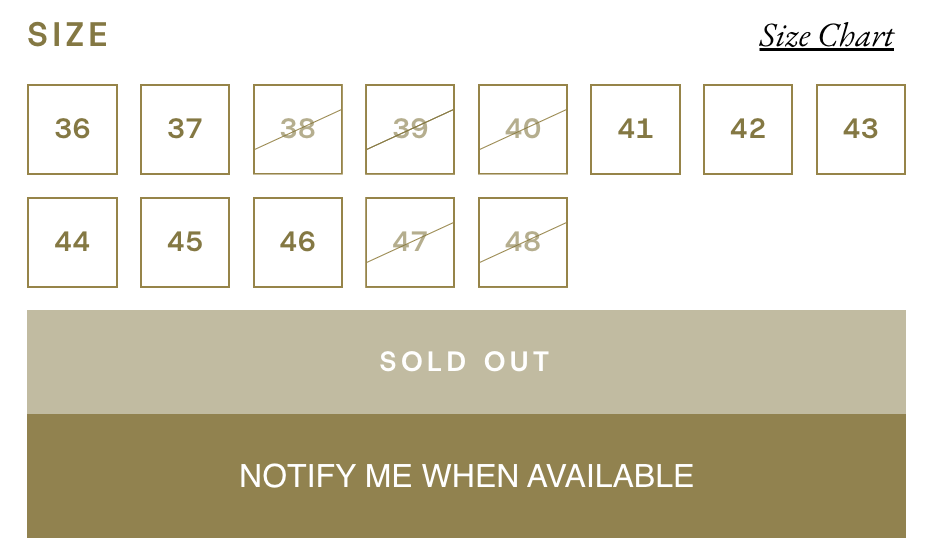
After clicking the button, they can enter their email address to request a restock notification for the selected product or variant. This adds the customer to your Klaviyo back-in-stock flow, where they’ll wait until that specific item is available again.
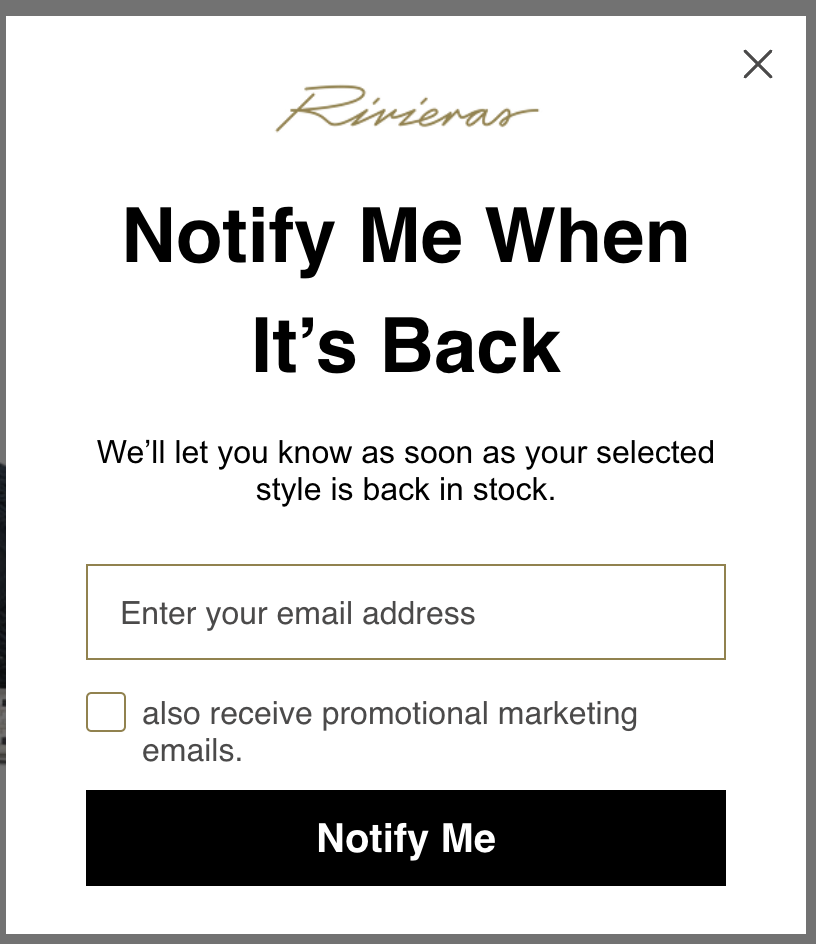
Once it’s restocked, Klaviyo automatically sends the back-in-stock email, giving the customer a direct way to return and complete their purchase.
How to Create a Back-in-Stock Form in Klaviyo
Klaviyo provides prebuilt form templates, so Shopify and BigCommerce stores can create the experience without manually designing every step.
- Open the sign-up form library
- Choose a back-in-stock form
- Select your marketing lists
- Configure the product display button
- Choose the button’s location
- Customize the form
- Review product targeting
- Publish the form
Once your back-in-stock form is live in Klaviyo, the next step is to create the back-in-stock flow that will send customers a notification when their selected product becomes available again.
How to Build a Klaviyo Back-in-Stock Flow
The form collects the request, while the flow controls what happens after the shopper signs up. Once the requested product or variant is back in stock, the flow automatically moves the shopper forward and sends the configured notification.
You can start with a prebuilt flow from Klaviyo’s Flow Library or build your own. If you’d like to create your back-in-stock flow from scratch, here’s how to set it up:
- Go to Flows.
- Select Create flow.
- Click Build your own.
- Choose Subscribed to Back in Stock as the trigger.
- Add the Back in stock delay immediately after the trigger.
- Add the restock email or SMS after the delay.
- Customize the message and product information.
- Turn the message live after testing it.
How the back-in-stock delay works
The back-in-stock delay keeps customers in the flow until the product or variant they requested becomes available again. Unlike a regular time delay, it doesn’t wait for a fixed number of hours or days.
Instead, the customer remains at this step until the requested item meets your inventory requirements. Once it does, they move to the next step in the flow and receive the restock notification.
In most cases, one restock message is enough. Klaviyo recommends keeping these flows between one and three messages to avoid overwhelming customers.
How to Analyze Back-in-Stock Demand
The flow can recover sales after a restock, but the requests themselves can also support inventory planning.
Klaviyo’s Back in Stock Report displays recent activity at the product and variant level. Depending on the report view, teams can review information such as:
- SKU
- Variant ID
- Product name
- Variant title
- Queue
- Moved to next step
- Cancelled
- Last added
- Unit price
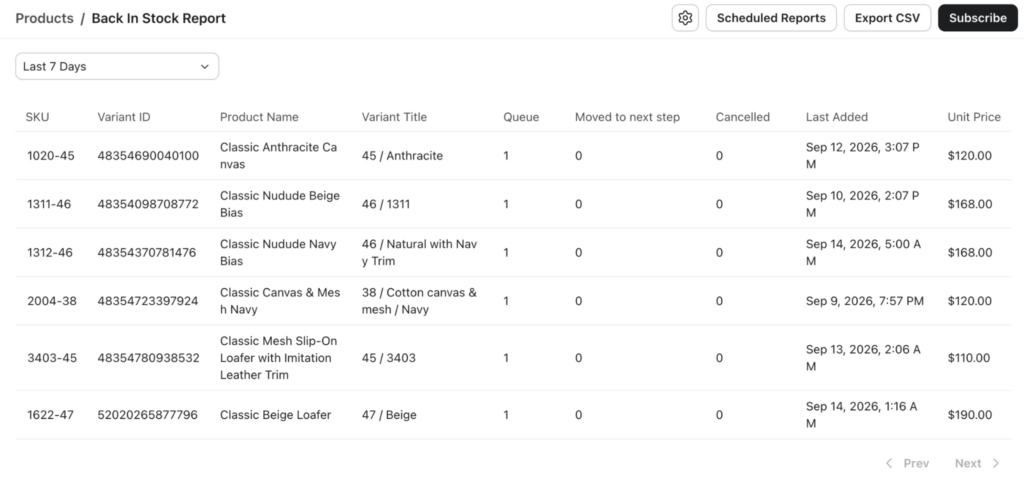
You can also export this data as a CSV or schedule back-in-stock reports for regular monitoring. This makes it easier to track changes in customer demand and use that information when planning future inventory.
Why Variant-Level Analysis Matters
A product can appear adequately stocked at the product level while still losing sales because its most popular variant is unavailable.
Consider a footwear brand with 300 units of one loafer in stock. The total inventory may look healthy, but that number tells an incomplete story if the most popular sizes are sold out and most remaining units are concentrated in less frequently purchased sizes.
The same problem can appear with:
- Apparel sizes
- Product colors
- Materials
- Flavors
- Pack sizes
- Product quantities
- Regional variations
This is why the queue should be analyzed using the product name, variant title, SKU, and variant ID together.
The most useful question is not simply, “How many people are waiting for this product?” It is, “Which exact version of this product are they waiting for?”
Connecting Klaviyo Demand With Lebesgue Product Intelligence
Klaviyo and Lebesgue answer different parts of the inventory question.
Klaviyo shows the demand that could not convert because the requested item was unavailable. Lebesgue adds context about existing inventory, sales velocity, product performance, and future stock risk.
| Klaviyo can reveal | Lebesgue can reveal |
|---|---|
| Products customers are waiting for | Products currently at risk of selling out |
| Demand by product and variant | Inventory by product and variant |
| Back-in-stock queue size | Current inventory levels |
| Requested sizes, colors, or materials | Sales velocity and estimated days until stockout |
| Recent waitlist activity | Product-performance trends |
| Demand that could not immediately convert | Products driving sales and customer acquisition |
Lebesgue Product Intelligence helps e-commerce teams understand which products drive sales, attract first-time buyers, and contribute to long-term revenue. It also tracks performance across different periods to identify seasonal and emerging trends.
This context is important because the largest waitlist is not always the highest priority. A product with a moderate queue but strong sales velocity may need more urgent attention than one with a larger queue but weaker conversion. Similarly, products that attract new customers may need additional inventory protection before back-in-stock requests begin accumulating.
Identify Products at Risk Before They Sell Out
Back-in-stock data is reactive: it becomes available after shoppers encounter unavailable inventory.
Lebesgue Stock Inventory adds a proactive view by helping teams monitor:
- Current inventory
- Product- and variant-level stock
- Sales per day
- Estimated days until a product goes out of stock
- High-selling units at risk
- Performance based on orders or revenue
- Availability status
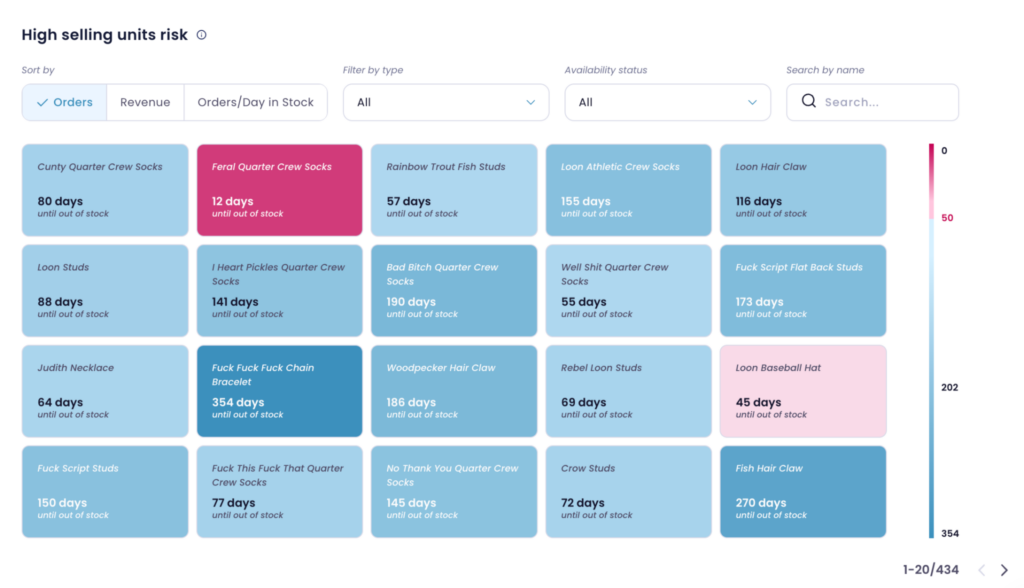
The product inventory overview can also be expanded to examine individual variants. This helps e-commerce stores identify cases where total inventory may appear healthy while specific variants are running low or already out of stock.
Klaviyo helps you understand what customers wanted after an item became unavailable. Lebesgue helps you identify which products may become unavailable next.
Turning the Data Into Restocking Decisions
Once you know which products and variants customers are waiting for, the next question is what should you actually restock first?
A large back-in-stock queue is a strong signal of customer interest, but it doesn’t tell the whole story. Historical sales alone can also miss demand that couldn’t convert because an item was unavailable.
That’s why restocking decisions are more useful when you look at back-in-stock demand alongside sales velocity, current inventory, conversion, margin, and product performance. Together, these signals can help you identify which products need attention and how much inventory you may need.
| Signal | What it may indicate | Possible action |
|---|---|---|
| Large Klaviyo queue and continued stock risk | Strong unmet demand | Prioritize an urgent reorder |
| Large queue but low historical conversion | Interest may not translate into purchases | Restock carefully and review price or product-page friction |
| Small queue and strong sales velocity | Sales may be a stronger demand signal | Restock based primarily on product performance |
| High inventory and low sales velocity | Possible overstock | Reduce purchasing or increase merchandising support |
| One variant has significantly higher demand | The assortment may not match customer demand | Adjust the size or color mix |
| Strong first-time customer performance | The product may support acquisition | Protect availability and consider paid-media support |
| Strong demand and healthy margin | Potential high-value restock opportunity | Increase reorder priority and marketing support |
Back-in-Stock Best Practices
To get more value from your back-in-stock setup, focus on both the customer experience and the demand data it creates:
- Analyze demand at the product and variant level. A product may have enough inventory overall while a popular size, color, or other variant continues to sell out. Variant-level analysis gives you a clearer picture of what customers actually want.
- Keep the form simple. Ask only for the information needed to send the restock alert, and clearly separate back-in-stock notifications from optional marketing consent.
- Match notifications to available inventory. If you restock a limited number of units, avoid notifying more customers than the available inventory can reasonably support.
- Test the full customer experience. Check the product-page button, form, flow, and notification on both desktop and mobile to make sure the process works as expected.
- Look beyond the waitlist size. Compare back-in-stock requests with current inventory, sales velocity, margin, and seasonality. A large queue can signal demand, but these additional metrics provide the context needed to make better restocking decisions.
Summing Up
Klaviyo back-in-stock is useful for more than bringing customers back when a product becomes available. Every request is also a signal of demand, showing you which products and specific variants customers wanted but couldn’t purchase.
The real value comes from putting that demand into context. By combining Klaviyo waitlist data with Lebesgue insights such as current inventory, sales velocity, product performance, and estimated stockout timing, you can better understand what customers want, what is selling, and what may run out next.
Instead of simply reacting when products sell out, these insights can help you make more informed restocking decisions, adjust inventory at the variant level, and keep high-demand products available when customers are ready to buy.
Frequently Asked Questions about Klaviyo Back-In-Stock Form and Flows
When an eligible product or variant becomes unavailable, Klaviyo displays a Notify me button on the product page. After a shopper submits their contact information, they enter a back-in-stock flow and receive an alert when the requested item is replenished.
Go to Sign-up forms, select Create form, and choose a back-in-stock template. Customize the button, fields, consent options, design, and success message. Once published, the button automatically appears for eligible out-of-stock items.
Yes. A back-in-stock request can be associated with a specific product variant, allowing shoppers to wait for a particular size, color, material, or other option.
Not automatically. Email marketing consent can be collected separately through an optional checkbox. SMS and WhatsApp alerts require the appropriate consent and disclosure language.
Back-in-stock requests reveal which products and variants have unmet demand. When combined with current inventory, sales velocity, margins, seasonality, and estimated stockout timing, this data can help ecommerce stores prioritize reorders and improve variant quantities.