Shipping protection is sold as free revenue. A small toggle at checkout, a $2.95 fee, and a new line on the P&L. What rarely shows up on that P&L is the shoppers who saw the fee, hesitated, and left.
This guide explains what shipping protection is, why it so often works against your conversion rate, what real store data shows, and how to offer protection without paying for it in lost orders.
Key takeaways
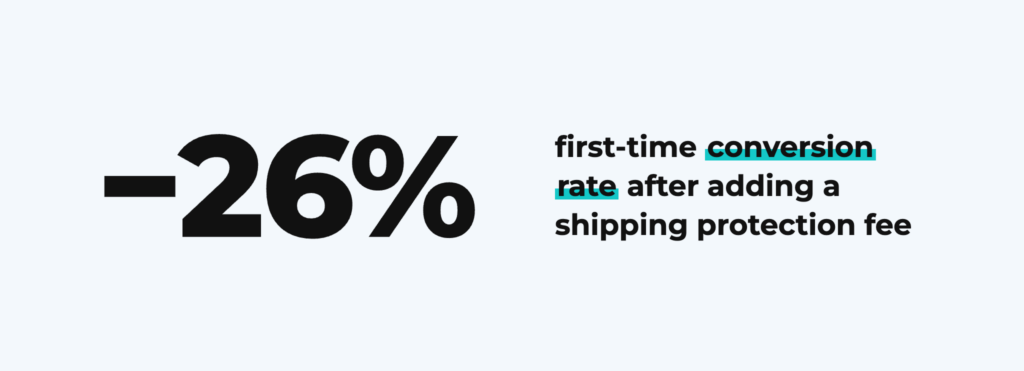
- Conversion: a food brand’s first-time conversion rate fell from 1.30% to 0.96% (−26%) after adding shipping protection. Visitors fell only 2.5%.
- Where shoppers stop: at a skincare brand, the share of Meta shoppers moving from add-to-cart to checkout fell from 54.3% to 40.4%, at the side cart where the protection fee first appears.
- Breakeven: with a $2.95 fee, 40% opt-in and a 50% gross margin, the fee stops paying for itself once conversion falls by about 3.3%.
- Trust: pre-checked fees are the setup most likely to trigger chargebacks and complaints.
- Fix: make protection opt-in, show it in the cart, label it plainly, and measure revenue per visitor, not attach rate.
What is shipping protection?
Shipping protection is an optional fee, usually $1 to $5 or a small percentage of the cart, that covers an order if it is lost, damaged or stolen in transit. It is sold by third-party apps such as Route, Corso, ShipAid, Seel and Navidium, which add a protection offer to the cart, side cart or checkout.
These apps spread fast for one reason: they are pitched as a profit center. Many let the merchant keep the fees and pay the rare claim from the pool, so every opt-in looks like pure margin.
The widget usually sits in the cart, the side cart or the checkout itself. That placement is the problem. It puts a new cost and a new decision at the exact moment the shopper is about to pay. How much it hurts depends mostly on how it is set up:
| Setup | Where the shopper sees it | Default | Likely conversion friction | Trust risk |
|---|---|---|---|---|
| Pre-checked fee on the payment step | Checkout | On | Highest | High |
| Pre-checked fee in cart or side cart | Cart | On | High | High |
| Opt-in checkbox in cart | Cart | Off | Medium | Low |
| Two equal buttons (with / without protection) | Cart | Shopper chooses | Lower | Low |
| Protection included in product price | Nowhere, it is built in | Included | None added | None |
Does shipping protection hurt conversion rate?
Often, yes. Shipping protection hurts conversion rate when it adds an unexpected cost, contradicts a free shipping promise, or adds a new decision right before payment. Five mechanisms explain most of the damage.
- It is a surprise cost, and surprise costs kill carts. Unexpected extra costs, such as shipping, taxes and fees, are one of the most common reasons shoppers abandon a cart. A protection fee is exactly this kind of cost: it appears late, it was not on the product page, and it makes the total higher than the shopper expected.
- It breaks the “free shipping” promise. If your ads and banners say free shipping, a “Shipping Protection” line at checkout reads like shipping that is not free after all. The shopper does not parse the difference between shipping and insurance. They see a shipping-related charge they were told would not exist.
- It adds a decision at the worst possible moment. Checkout should be a straight line to the pay button. A protection widget asks a new question: is my package at risk? Do I need this? What happens if I say no? Some apps even warn that shoppers who decline are responsible for lost items. That plants doubt about your delivery reliability right when you need confidence most.
- Pre-checked boxes erode trust. When the fee is added by default, many shoppers do not notice it until the order confirmation or the card statement. The ones who do notice it at checkout often feel tricked. Some leave. Others pay, then file a chargeback or never come back. Neither shows up in your attach-rate dashboard.
- The revenue you see hides the orders you lose. Protection apps report attach rate and fee revenue. They do not report the shoppers who abandoned because of the fee. The fee only pays off if it costs you fewer conversions than it earns. Here is the math for a store doing 10,000 orders a month:
| Conversion drop | Lost orders | Lost gross profit | Fee revenue kept | Net monthly effect |
|---|---|---|---|---|
| 1% | 100 | $3,500 | $11,682 | +$8,182 |
| 3% | 300 | $10,500 | $11,446 | +$946 |
| 5% | 500 | $17,500 | $11,210 | −$6,290 |
| 10% | 1,000 | $35,000 | $10,620 | −$24,380 |
| 26% (food brand below) | 2,600 | $91,000 | $8,732 | −$82,268 |
Assumptions: $70 AOV, 50% gross margin, 40% opt-in, $2.95 fee, merchant keeps every fee, claims not deducted, lifetime value of lost customers not counted. Even with those generous assumptions, the fee stops paying for itself at a conversion drop of about 3.3%. Count claims and lost repeat purchases and the breakeven comes even sooner.
What first-party data shows: a food brand before and after adding shipping protection
Vendor case studies are one side of the story. Here is the other: first-party analytics from a food brand that added a shipping protection app on July 27, 2026. We compared first-time customers in the 10 weeks before with the 10 weeks after, grouped by the type of page they landed on.
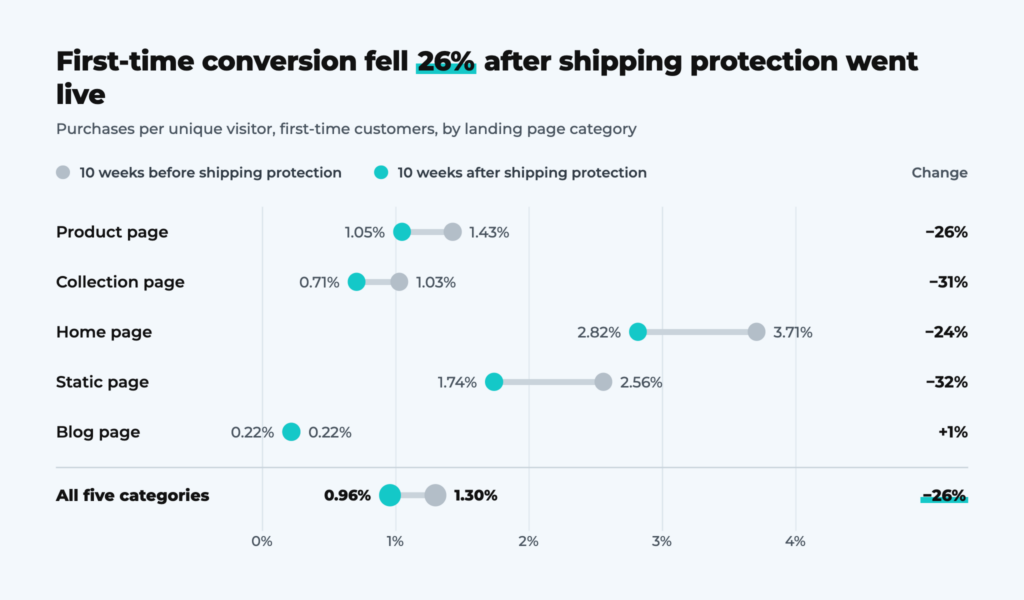
Store analytics, first-time customers · cart and checkout pages left out (under 200 visitors)
| First-time customers, five landing categories | Before shipping protection | After shipping protection | Change |
|---|---|---|---|
| Visitors | 84,338 | 82,212 | −2.5% |
| Purchases | 1,098 | 787 | −28% |
| Conversion rate | 1.30% | 0.96% | −26% |
| Average order value | ~$105 | ~$134 | +28% |
Traffic barely moved. Across the five main landing categories, first-time visitors fell just 2.5%, from 84,338 to 82,212. Purchases fell 28%, from 1,098 to 787. That is roughly 280 first-time customers who would have bought at the old conversion rate, and every one of them was a future repeat buyer for a food brand built on reorders.
The drop appears almost everywhere a buyer starts. Product, collection, home and static pages all lost 24% to 32% of their conversion rate. Blog pages stayed flat, but they produced only 26 first purchases in each period, too few to read either way. When every main entry point falls by a similar amount, the cause is usually something they all share. The one step every buyer shares is checkout.
Revenue fell less than orders, down 8% from $114,799 to $105,259, because average order value rose from about $105 to $134. A protection fee of a few dollars cannot explain a $29 jump. A likelier reading is that the extra checkout friction filtered out smaller, more hesitant first orders, the very customers a food brand needs to win and then keep.
A fair caveat: this is a before-and-after comparison, not an A/B test. Seasonality, promotions or ad mix may also have shifted between summer and early autumn. But a uniform 26% drop across every landing page, with flat traffic, is exactly the pattern the checkout friction argument predicts, and exactly why it deserves a proper test.
A skincare brand shows the same pattern at the step where the fee first appears. Its shipping protection widget sits in the side cart.
| Meta shoppers, skincare brand | July 2025 | July 2026 | Change |
|---|---|---|---|
| Add-to-carts | 805 | 1,157 | +44% |
| Checkouts started | 437 | 468 | +7% |
| Add-to-cart to checkout rate | 54.3% | 40.4% | −13.9 pts |
More add-to-carts can dilute intent, but checkouts barely grew. Shoppers were filling carts, then stopping at the side cart, where the fee appears.
How to offer protection without killing conversion
If you want the revenue and the support savings without the hidden cost, use this checklist.
- Make it opt-in. Leave the box unchecked, or use two equal buttons (“Checkout with protection” / “Checkout without”). A real choice protects both trust and you.
- Show it early. Put the offer in the cart or side cart, not on the payment step. Shoppers should see the full total before they enter card details.
- Label it plainly. Say what it covers, what it costs, and that it is optional. Avoid wording that implies shipping is no longer free.
- Don’t punish a “no.” Never imply that shoppers who decline are on their own if a package goes missing. That message hurts trust in your whole delivery promise.
- A/B test against no widget at all. Measure conversion rate, revenue per visitor and AOV, not just attach rate. Run it long enough to cover mobile and desktop traffic.
- Track the after-effects. Watch chargebacks, support tickets about the fee, and repeat purchase rate for buyers who saw the widget.
- Consider absorbing the cost. For many stores, building loss and damage into product prices and simply resolving claims is cheaper than the conversions a fee costs. “Every order protected, free” can be a stronger message than a $2.95 upsell.
How to measure the real impact of shipping protection
Attach rate tells you how many shoppers paid the fee. It does not tell you how many left. Track these metrics before and after you add, change or remove a protection widget:
| Metric | What it tells you | Warning sign |
|---|---|---|
| Conversion rate, first-time customers | Whether new buyers still complete checkout | Drops across all landing pages at once |
| Add-to-cart to checkout rate | Whether the fee stops shoppers in the cart | Falls while add-to-carts rise |
| Revenue per visitor | The net effect of fee revenue and lost orders | Flat or down while fee revenue grows |
| Average order value | Whether smaller first orders disappear | Jumps far more than the fee amount |
| Chargebacks and fee-related tickets | Whether shoppers feel tricked | Disputes mentioning the protection line |
| Repeat purchase rate | Long-term cost of the first experience | Lower for buyers who saw the widget |
Lebesgue breaks conversion rate down by new and returning customers, landing page and channel, so you can see a checkout change in the same view the food brand above was analyzed in. Compare your numbers with the Facebook benchmarks by industry to separate a checkout problem from an ad problem.
The bottom line
Shipping protection is not evil, but the way most stores run it is expensive. A pre-checked fee on the payment page adds a surprise cost and a new doubt at the moment you most need a smooth path to “Pay now.” The fee revenue is easy to see. The lost orders are not.
Before you add another checkout widget, ask one question: would I keep it if I could see every shopper it sent away? Then run the test and find out.
Frequently Asked Questions about Shipping Protection
Shipping protection can reduce conversion rate, especially when the fee is pre-checked, appears late in checkout, or sits next to a free shipping promise. In first-party data from a food brand, first-time customer conversion fell 26% in the 10 weeks after a protection app went live, with traffic down only 2.5%. Vendor case studies sometimes show the opposite, usually for opt-in setups with two clear buttons in the cart. The effect depends on placement, default state and labeling, so the reliable answer for any store comes from an A/B test against no widget.
Shipping protection is worth it only if the fee revenue and support savings exceed the profit from orders it costs you. With a $2.95 fee, 40% opt-in, a $70 AOV and a 50% gross margin, the fee breaks even at roughly a 3.3% drop in conversion. Stores selling fragile or high-value products, where shoppers genuinely worry about loss, are more likely to come out ahead. Stores selling low-priced, repeat-purchase products, such as food or skincare, are more likely to lose more in first orders and lifetime value than they earn in fees.
No, shipping protection should not be pre-checked. A pre-checked fee is the setup most likely to cause abandonment, chargebacks and complaints, because many shoppers only notice it on the order confirmation or card statement. A safer setup is an unchecked box or two equal buttons, such as checkout with protection and checkout without, shown in the cart before the payment step.
The shipping protection widget should go in the cart or side cart, not on the payment step. Shoppers should see their full total, including any optional fee, before they enter card details. Showing the offer early turns it into a calm choice rather than a last-second surprise. Label it plainly with what it covers, what it costs and that it is optional, and avoid any wording that suggests free shipping is no longer free.
Run an A/B test with half of visitors seeing the protection widget and half seeing no widget at all. Measure conversion rate, revenue per visitor and average order value, not just attach rate, and run the test long enough to cover weekdays, weekends, mobile and desktop traffic. If you cannot run a split test, compare first-time customer conversion by landing page for equal periods before and after launch, and check that traffic and promotions stayed similar.
The main alternative is to absorb the cost: build expected loss and damage into product prices and resolve claims yourself. For many stores this costs less than the conversions a fee loses, and it turns protection into a selling point, such as every order protected, free. Another option is to offer protection only on fragile or high-value products, where shoppers value it most and the fee feels justified.